Product Details
Aspectium Opportunity Workspace

A practical workspace for a serious job search.

Manage opportunities, contract leads, consulting prospects, resumes, notes, sourcing sessions, application materials, and follow-ups in one organized workflow. Your job-search data is stored locally on your device, not in an Aspectium cloud database.
Desktop Perpetual License coming soon
Data stored locally
No account required for core tracking
No Aspectium cloud database
Optional AI-assisted import
Backup and restore
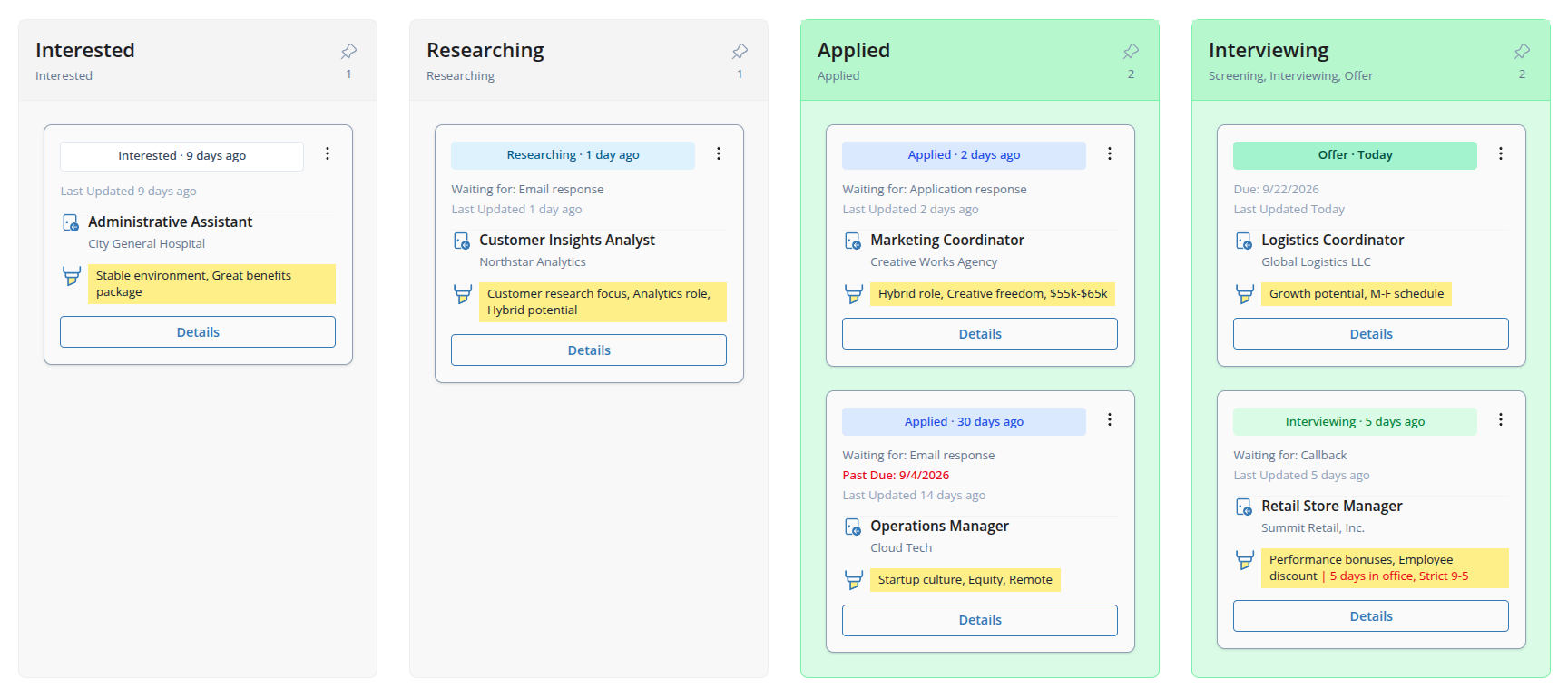
Screenshot of the Opportunity Workspace opportunity list showing job opportunities, statuses, due dates, company details, and review information.

Explore Opportunity Workspace

A clearer workflow for a busy search.

Opportunity Workspace is more than a list of applications. It helps you manage the full search workflow: leads, context, materials, follow-ups, sourcing history, and decisions.
Find or receive a lead
Capture the opportunity
Attach context: resume, notes, links, source, and job description
Track progress: status, due date, waiting state, and follow-up
Review and decide using board, list, and insights views
Source again using channels, keywords, and search history
Workflow illustration showing Find lead, Capture opportunity, Attach context, Track progress, Review and decide, and Source again steps.

Choose the edition that fits how you want to work.

Start free in the browser, use the Windows desktop app while subscribed through the Microsoft Store, or choose the coming-soon Desktop Perpetual License if you prefer to buy once.

Free Web Edition

Best for
Trying the app or managing a lighter search
Availability
Available now in the browser
Price model
Free
Where workspace data is stored
Stored locally in this browser
Aspectium cloud database for your data
No
Account required for core tracking
No
What sign-in is used for
AI-assisted import and account/session actions
AI-assisted job-posting import
Included at no extra charge for a limited time, with usage limits; sign-in required
Backup and restore
Available in Persistent mode
Data portability
Backup and restore supported
Desktop app
No
What happens if payment/subscription ends
Not applicable

Windows Store Desktop

Best for
Serious Windows desktop use
Availability
Available through the Microsoft Store
Price model
Subscription through Microsoft Store
Where workspace data is stored
Stored locally on your Windows device
Aspectium cloud database for your data
No
Account required for core tracking
No
What sign-in is used for
AI-assisted import and account/session actions; purchase handled through Microsoft Store
AI-assisted job-posting import
Included at no extra charge for a limited time, with usage limits; sign-in required
Backup and restore
Available
Data portability
Backup and restore supported
Desktop app
Yes
What happens if payment/subscription ends
Existing data remains accessible. Creating new records requires an active trial or subscription

Desktop Perpetual License

Coming Soon
Best for
Users who prefer to buy once instead of subscribing
Availability
Coming soon from the Aspectium website
Price model
One-time purchase; no subscription required
Where workspace data is stored
Stored locally on your desktop device
Aspectium cloud database for your data
No
Account required for core tracking
No
What sign-in is used for
AI-assisted import and purchase/license-related actions where applicable
AI-assisted job-posting import
Included at no extra charge for a limited time, with usage limits; sign-in required
Backup and restore
Available
Data portability
Backup and restore supported
Desktop app
Yes
What happens if payment/subscription ends
App continues under perpetual license terms; update eligibility depends on license period
All editions are designed around local workspace data. Your opportunities, resumes, notes, attachments, and sourcing history are not stored in an Aspectium cloud database.
If a Windows Store subscription ends, your existing data is not deleted. You can still view, edit, search, back up, restore, archive, and delete existing records. Creating new opportunities, resumes, channels, and sourcing sessions requires an active trial or subscription.

Your job-search data stays on your device.

Opportunity Workspace is designed so your job-search records are stored locally, not in an Aspectium cloud database. Signing in does not upload your opportunities, resumes, notes, attachments, or sourcing history.

No required account for core tracking

Create and manage opportunities, resumes, notes, sourcing sessions, local records, backups, and restores without signing in.

No Aspectium cloud database

Your workspace data is stored in your browser or desktop app, depending on the edition you use.

Sign-in is limited

The account is used for limited online services such as AI-assisted import and account/session actions. Signing in does not move your workspace data to Aspectium servers.

AI sends selected content only

When you use AI import, the selected job-posting text needed for that request is sent for processing. Your full workspace data is not sent.
Illustration showing Opportunity Workspace data stored locally on the user's device, with an optional AI request sending only selected job-posting text for processing.

See every opportunity in context.

Keep status, company context, due dates, highlights, waiting state, sources, links, notes, job descriptions, resume usage, application copy, and cover letters tied to the right opportunity.

Pipeline board

Move opportunities through your workflow and see active, waiting, due, and recently closed items at a glance.

List view

Filter and sort opportunities when you need a more detailed review.

Insights

Review issues that need attention, recent outcomes, and pipeline health.

Opportunity details

Keep application dates, resume used, notes, links, job description text, and supporting files together.
Screenshot of the Opportunity Workspace opportunity details view showing company context, status, application details, notes, and links information.

Keep resume versions connected to the opportunities that used them.

When you tailor resumes for different roles, it is easy to lose track of what you sent where. Opportunity Workspace lets you maintain resume records, link them to opportunities, and keep application materials close to the application record.
  • Resume records with version name, date, and description
  • Resume file or URL attachments
  • Opportunity links showing where a resume was used
  • Application copy and cover letter attachments on opportunity records
  • Archive and restore support for old resume versions

Build a sourcing system, not just an application list.

Opportunity Workspace treats sourcing as its own workflow. Record where you searched, which keywords you used, what you found, and when it is time to search again.

Active searches

Group open searches by keyword or channel, see how long it has been since the last session, and restart a search with context already filled in.

Sourcing history

Review completed searches by time period, filter past sessions, and keep search notes and results available.

Channels

Manage job boards, company career pages, professional communities, cold outreach, personal network sources, consulting prospects, and other source types.
Screenshot of the Opportunity Workspace active sourcing view showing grouped search channels, keywords, and time since the last sourcing session.
Screenshot of the Opportunity Workspace sourcing history view showing completed search sessions, notes, results, and search again actions.
Screenshot of an Opportunity Workspace sourcing channel card for tracking job boards and other search sources.

Use AI to speed up intake, then review before saving.

Paste a job posting, analyze it, review the structured draft, make edits, and import it into an opportunity record. AI helps reduce manual entry, but you stay in control of what gets saved.
AI-assisted import is optional. Sign-in is required for AI analysis. When you use it, the selected job-posting text is sent for processing. Your full workspace data is not sent.
AI usage is currently included at no extra charge for a limited time, with usage limits.
Screenshot of the Opportunity Workspace AI import view showing job-posting text input, analyze action, and a reminder to verify AI-extracted data.

Back up your search before you need it.

Opportunity Workspace includes backup and restore tools so you can protect your data or move it between supported editions. Restoring a backup overwrites the current app data in the current browser or desktop app, so backups should be handled carefully.
  • Web backup is available in Persistent mode.
  • Desktop backup is available in the desktop app.
  • Backup files are stored locally.
  • Restore validates the backup format before applying it.
  • Backup and restore are the supported way to move data between supported editions.
Screenshot of Opportunity Workspace backup and restore controls for creating a backup, restoring a backup, and reviewing local backup status.

Built to grow beyond basic tracking.

Opportunity Workspace is designed as a broader local-data workspace for managing the work around opportunities: tracking leads, organizing materials, managing sourcing, and preparing more targeted applications over time.

Common questions

For setup, trial, backup, restore, and troubleshooting details, see the Opportunity Workspace Help page.
Is my workspace data stored in the cloud?
No. Your opportunities, resumes, notes, attachments, and sourcing history are stored locally in your browser or desktop app, depending on the edition you use. Signing in does not upload your workspace data.
Do I need an account?
No account is required for core tracking. Sign-in is used for limited online services such as AI-assisted import and account/session actions.
What is the difference between web and desktop?
The free web edition stores data locally in your browser and is a good way to start. The desktop app stores data locally on your device and is designed for a more durable daily workflow.
What happens if my Windows Store subscription ends?
Your existing data is not deleted. You can still view, edit, search, back up, restore, archive, and delete existing records. Creating new opportunities, resumes, channels, and sourcing sessions requires an active trial or subscription.
Is the Desktop Perpetual License available now?
Not yet. The Desktop Perpetual License is coming soon for users who prefer to buy once instead of subscribing.
What does AI import send for processing?
AI import sends the selected job-posting text needed for the request. Your full workspace data is not sent.

Bring order to your search before details start slipping.

Start with the free web edition, or use the desktop app for a more durable local workflow.
This website uses cookies to ensure you get the best experience. Learn more